Chat
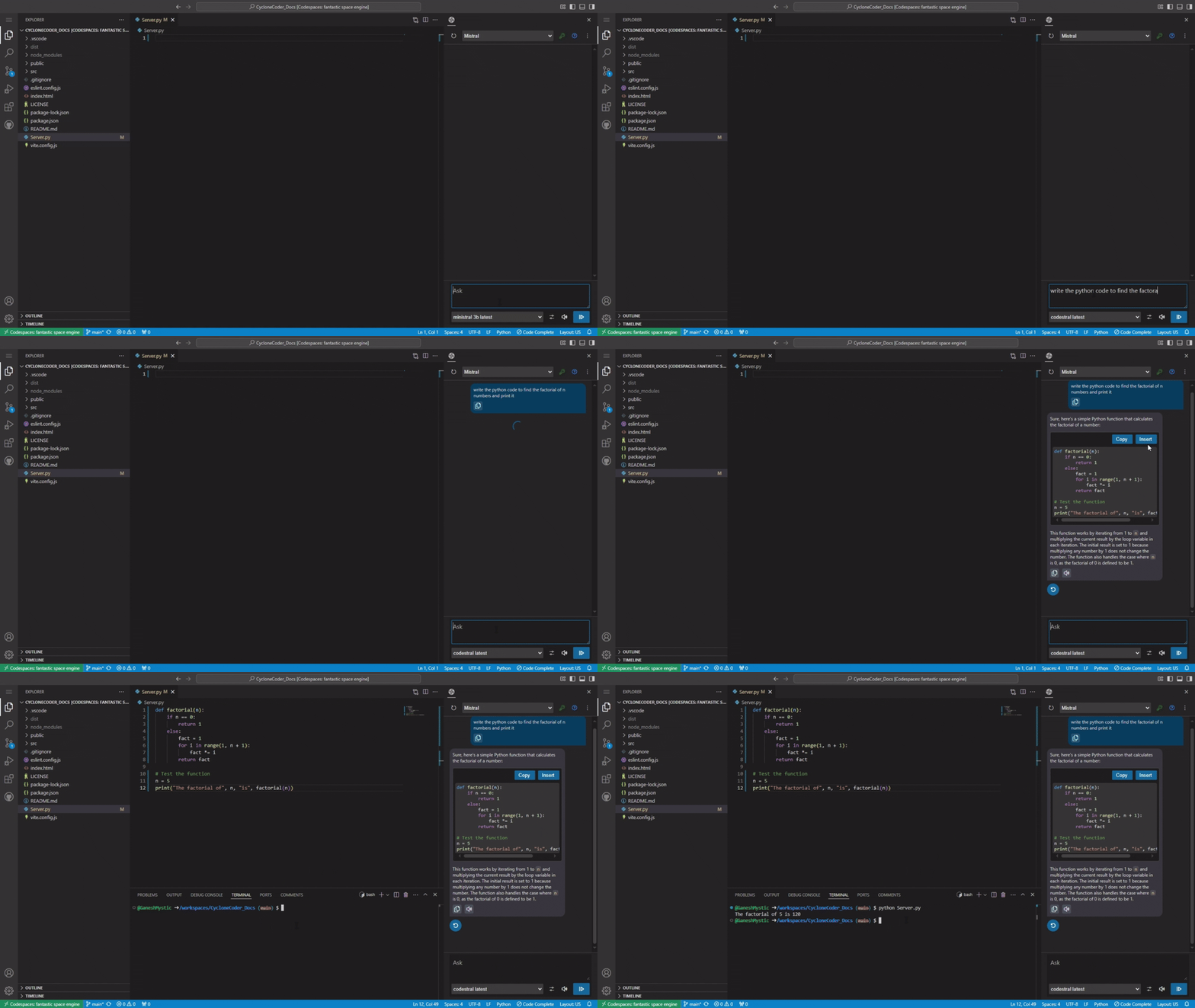
Chat to Code
- Code suggestions provided by the model can be copied to clipboard by clicking the
Copybutton. - The
Insertbutton will insert the suggested code Into the editor or replace the selected code. - The
- You can use
ctrl + shift + Qto copy the selected code from editor to chat window.
ℹ️
The chat uses Markdown format to send and receive response.
All basic Markdown syntax like tables, link and list is supported
Read out Response
-
Use OS speech to read out the response by using the
speakericon at the input box. -
The default system voice will be used for reading the response.
-
You can use the speaker button below
assistant chartresponse to read out that particular response.ℹ️Read out response is only supported for limited linux operating systems.
Configure
- On the bottom of the chat boxYou can find dropdown for changing the model.
- The
Systemmessage defines your assistant state. you can state how your assistant should respond here.- Increase the
temperaturewill increase the creativity of the model.
- The speaker auction allows you to activate Readout Response.
Questions or Feedback?
🐞
Cyclone Coder is still under development, and your input is valuable!
Have a question or feedback? Feel free to open an issue!